Showing posts with label Html. Show all posts

Tuesday, 13 January 2015

Reading values from HTML and processing those values in Java Script


All of us know HTML is only static representation of a web  page , we always wanted to add some functionality to it. For getting started with JavaScript is the best one. Lets now see a basic HTML page with some JavaScripting in it.

Here we will take two text boxes for entering 2 values and 4 buttons for addition, substraction ,multiplication and division respectively. When we enter some values in those textboxes and press any button then using JavaScript we perform the calculation and return the result.

For each textbox we will give some id so as to refer them in JavaScript

Enter first number:
<input type ="text" id="1stnum"  /><br>
Enter second number:
<input type ="text" id="2ndnum"  /><br>

we will also have 4 functions for calculating their sum , product , differencs and division respectively andwe call a function corresponding to it  when the button is clicked .
<input type="button" id="sum" value="sum" onclick="findsum()"/>
<input type="button" id="sub"value="sub" onclick="findsub()"/>
<input type="button" id="mul"value="mul" onclick="findmul()"/>
<input type="button" id="mul"value="div" onclick="finddiv()"/>

Now when any button is clicked its corresponding function is called.

We will get the value of the textbox in JavaScript by using
document.getElementById("elementId").value;

So now for getting the values of the 2  text boxes we use
document.getElementById("1stnum").value;

document.getElementById("2ndnum").value;

we will store those 2 values in variables x and y respectively and we will simply add or substract or multiply or divide x,y and store the result in another variable z.

Now for the result to show we will create an empty paragraph with some id and set the result to that empty paragarph.
<p id = "result"></p>

The Complete code is here,
<html>
<head>
<title>JavaScript Example</title>

<script>
function findsum()
{
    var y = document.getElementById("1stnum").value;
    var z = document.getElementById("2ndnum").value;
    var x = +y + +z;
    document.getElementById("result").innerHTML = "Sum is :" + x;
}
function findmul()
{
    var y = document.getElementById("1stnum").value;
    var z = document.getElementById("2ndnum").value;
    var x = +y * +z;
    document.getElementById("result").innerHTML = "Product is :" + x;
}
function findsub()
{
    var y = document.getElementById("1stnum").value;
    var z = document.getElementById("2ndnum").value;
    var x = +y - +z;
    document.getElementById("result").innerHTML = "Difference is :" + x;
}
function finddiv()
{
    var y = document.getElementById("1stnum").value;
    var z = document.getElementById("2ndnum").value;
    var x = +y / +z;
    document.getElementById("result").innerHTML = "Division is :" + x;
}</script>
</head>
<body style="text-align:center";>
<form>
Enter first number:
<input type ="text" id="1stnum"  /><br>
Enter second number:
<input type ="text" id="2ndnum"  /><br>
<input type="button" id="sum" value="sum" onclick="findsum()"/>
<input type="button" id="sub"value="sub" onclick="findsub()"/>
<input type="button" id="mul"value="mul" onclick="findmul()"/>
<input type="button" id="mul"value="div" onclick="finddiv()"/><br><br>

</form>
<p id = "result"></p>

</body>
</html>

OUTPUT :

Enter first number:
Enter second number:


Thursday, 1 January 2015

HTML , PHP - Login Page.


In this post i will show you how to create a basic login page and check those values in the database and also do some error checking like empty values are not allowed.

Here i will use xampp as a server and it has a database with 4 columns username , password, gender and name. (refer to my previous post on creating a registration form)


Now open a file in any text editor and place the following code :

<!DOCTYPE HTML> 
<html>
   <head></head>
   <body>
      <?php
         $servername = "127.0.0.1";
         $username = "codingcorner";
         $password = "yourPassword";
         $dbname="sample";
         
         
          $StatusValid = $StatusInValid =$unameErr  = $pwdErr = " ";
          $uname  = $pwd = "";
         
         if ($_SERVER["REQUEST_METHOD"] == "POST") {
           
         
           if (empty($_POST["uname"])) {
             $unameErr = "Username is required";
           } else {
             $uname = test_input($_POST["uname"]);
           }
         
           if (empty($_POST["pwd"])) {
             $pwdErr= "Password is required";
           } else {
             $pwd = test_input($_POST["pwd"]);
           }
         
           
         }
         ?>
      <h2>A Simple Login Form</h2>
      <form method="post" action="<?php echo htmlspecialchars($_SERVER["PHP_SELF"]);?>"> 
         Username: <input type="text" name="uname">
         <span class="error">* <?php echo $unameErr;?></span>
         <br><br>
         Password: <input type="password" name="pwd">
         <span class="error">*<?php echo $pwdErr;?></span>
         <br><br>
         <input type="submit" name="submit" value="Login"> 
      </form>
      <br><br>
      <?php
         $conn = mysqli_connect($servername, $username, $password,$dbname);
         
         if (!$conn) {
         die("Connection failed: " . mysqli_connect_error());
         }
         $sql= ("SELECT username, password FROM users WHERE username='$uname' && password='$pwd'");
         $result = mysqli_query($conn, $sql);
         if ($result && mysqli_num_rows($result) >0)
         {
             $StatusValid = "Successfully Logged in"; 
         }
         else
         {
         $StatusInValid = 'Username and Password NOT Found , TRY AGAIN !!';
         }
         mysqli_close($conn);
         
         function test_input($data) {
         $data = trim($data);
         $data = stripslashes($data);
         $data = htmlspecialchars($data);
         return $data;
         }
         
         echo "STATUS :";
         if ($_SERVER["REQUEST_METHOD"] == "POST") {
         echo $StatusValid; 
         echo $StatusInValid; 
         }
         ?>
   </body>
</html>
OUTPUT :

Initially


When Incorrect details are entered


When valid details are entered


The Entries in database are  (refer previous post - developing registration form )


That's it ! We are done with our login page.


Reference : W3schools

Wednesday, 31 December 2014

HTML , PHP - Registration Form


In this post i will show you how to create a basic registration page and store those values in the database and also do some error checking like empty values are not allowed.

Here i will use xampp as a server and create a database there with 4 columns username , password, gender and name. These are the values we will store in our database name sample and table name users.


Now open a file in any text editor and place the following code :


<!DOCTYPE HTML> 
<html>
<head>
</head>
<body> 

<?php

$servername = "127.0.0.1";
$username = "codingcorner";
$password = "yourPassword";


$nameErr = $unameErr = $genderErr = $pwdErr = "";
$name = $uname = $gender = $comment = $pwd = "";

if ($_SERVER["REQUEST_METHOD"] == "POST") {
  if (empty($_POST["name"])) {
    $nameErr = "Name is required";
  } else {
    $name = test_input($_POST["name"]);
  }

  if (empty($_POST["uname"])) {
    $unameErr = "Username is required";
  } else {
    $uname = test_input($_POST["uname"]);
  }

  if (empty($_POST["pwd"])) {
    $pwdErr= "Password is required";
  } else {
    $pwd = test_input($_POST["pwd"]);
  }

  if (empty($_POST["comment"])) {
    $comment = "";
  } else {
    $comment = test_input($_POST["comment"]);
  }

  if (empty($_POST["gender"])) {
    $genderErr = "Gender is required";
  } else {
    $gender = test_input($_POST["gender"]);
  }
}


try {
    $conn = new PDO("mysql:host=$servername;dbname=sample", $username, $password);
    // set the PDO error mode to exception
    $conn->setAttribute(PDO::ATTR_ERRMODE, PDO::ERRMODE_EXCEPTION);
     $sql = "INSERT INTO users (username, password , gender , name)
    VALUES ('$uname', '$pwd','$gender','$name')";
    // use exec() because no results are returned
    $conn->exec($sql);
    echo "Welcome !";
    }
catch(PDOException $e)
    {
    echo "Connection failed: " . $e->getMessage();
    }

function test_input($data) {
  $data = trim($data);
  $data = stripslashes($data);
  $data = htmlspecialchars($data);
  return $data;
}


?>

<h2>A Simple Registration Form</h2>
<form method="post" action="<?php echo htmlspecialchars($_SERVER["PHP_SELF"]);?>"> 
   Name: <input type="text" name="name">
   <span class="error">* <?php echo $nameErr;?></span>
   <br><br>
   Username: <input type="text" name="uname">
   <span class="error">* <?php echo $unameErr;?></span>
   <br><br>
   Password: <input type="password" name="pwd">
   <span class="error">*<?php echo $pwdErr;?></span>
   <br><br>
   Comment: <textarea name="comment" rows="5" cols="40"></textarea>
   <br><br>
   Gender:
   <input type="radio" name="gender" value="female">Female
   <input type="radio" name="gender" value="male">Male
   <span class="error">* <?php echo $genderErr;?></span>
   <br><br>
   <input type="submit" name="submit" value="Submit"> 
</form>

<?php
echo "<h2>Your Details:</h2>";
echo $name;
echo "<br>";
echo $uname;
echo "<br>";
echo $pwd;
echo "<br>";
echo $comment;
echo "<br>";
echo $gender;
?>

</body>
</html>
Now save this file as registration-tuts.php or any other name you wish in C:\xampp\htdocs or any path where your xampp is installed .
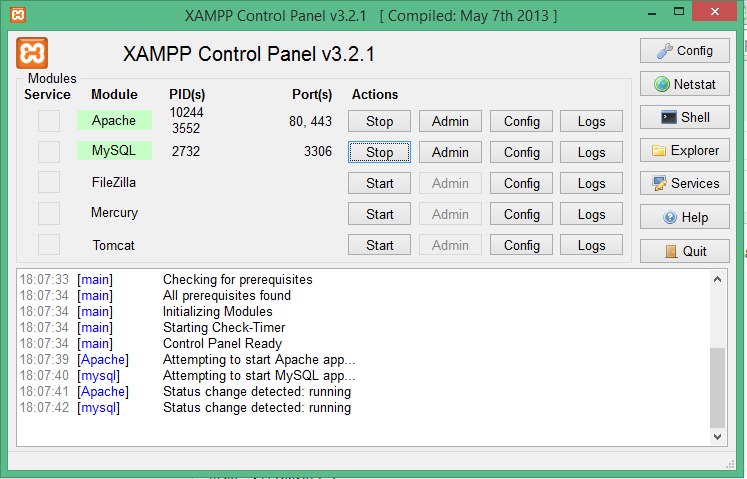
 Start Apache and Mysql in your xampp control panel.

 It looks something like this

Now open any browser and give the url as http://localhost/registration-tuts.php 
now the page we just created will open


OUTPUT : 

When the * mark (required fields ) are not filled it shows an error telling this field is required .


When all the fields  are filled .


Now we will check the database we created in the beginning for the details entered here.

In the browser go to localhost/phpmyadmin and then in the right side select your database and table , then it will show you the details you entered in the form we created.


That's it ! We are done with our registration form.


Reference : w3schools